Chapter 5: Controlling an RGB LED with PWM
Table of Contents
| Link | Purpose |
|---|---|
| 5. Chapter RGBLED | Freenove’s official C version – 5. Chapter RGBLED |
| Chapter 5 RGBLED - Starter Kit for Raspberry Pi Pico | Freenove’s official video description |
| Alire crate | Alire crate containing the Ada code in this chapter |
| GNATdoc documentation for this chapter | Automatically generated HTML documentation for the Ada code in this chapter |
This chapter was fairly straightforward: it extends the previous LED examples to control a common-cathode RGB LED. This type of LED has four pins and can produce the three primary colours as well as any mixture of them.
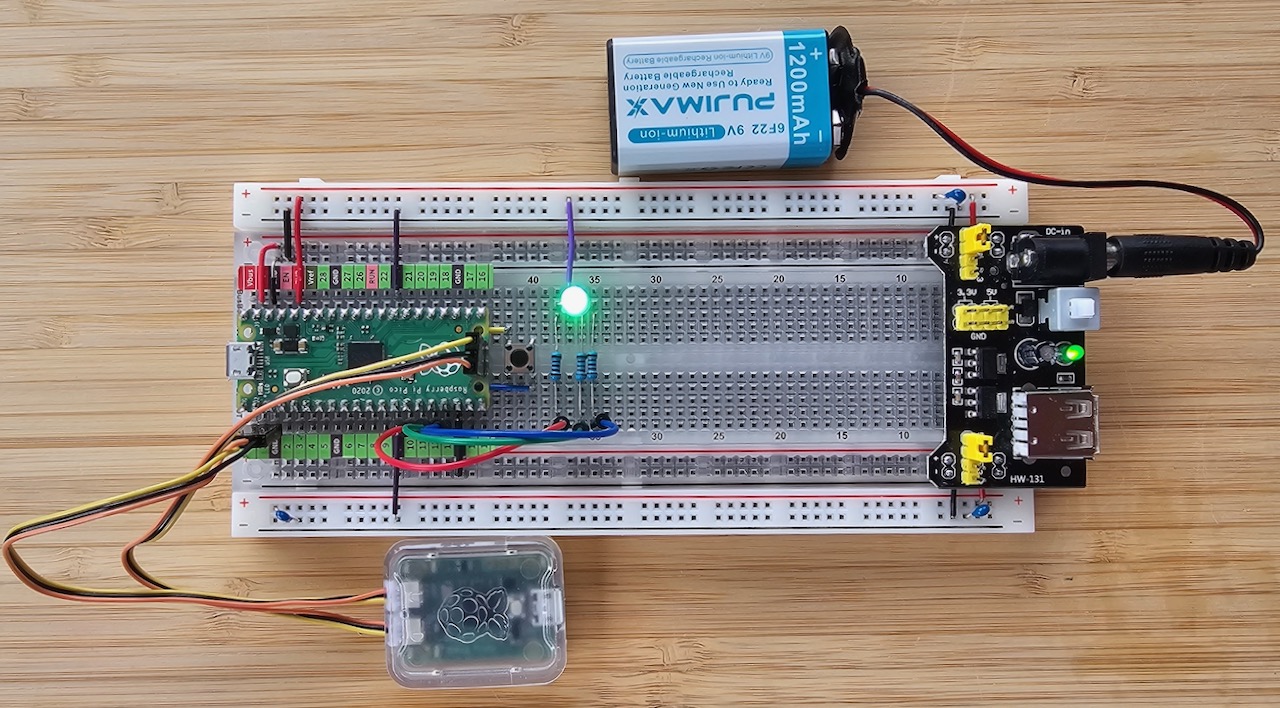
The hardware setup is clearly shown in the excellent Freenove video – I could not improve on their professional demonstration, so please watch it if you need the wiring details.
As in earlier chapters, I first created a reusable package to make colour control clean and simple.
Pico.Analog.RGB_LED #
The package provides an easy-to-use interface for controlling the colour of an RGB LED. You supply an array of three PWM points (one per colour channel) together with the desired intensity for red, green, and blue.
The LED is assumed to be common-cathode, so the PWM duty cycle directly controls brightness (0 = off, 255 = full brightness on the Pico’s 12-bit PWM). Note that the code inverts the values because the Pico’s PWM is active-high.
Two Set_Color procedures are provided: one accepts separate red/green/blue levels, and the other accepts a standard
24-bit RGB value. You can easily add more overloads as needed.
Package Specification #
package Pico.Analog.RGB_LED is

   type RGB_Color is mod 2**24;

   type Color_Type is
      (Red,
       Green,
       Blue);

   type Color_Array is
      array (Color_Type)
      of Pico.Analog.PWM_Point;

   procedure Set_Color
      (LED         : in Color_Array;
       Red_Value   : in Pico.Analog.Analog_Level;
       Green_Value : in Pico.Analog.Analog_Level;
       Blue_Value  : in Pico.Analog.Analog_Level);

   procedure Set_Color (LED : in Color_Array; Color : in RGB_Color);

end Pico.Analog.RGB_LED;
Package Body #
pragma License (Modified_Gpl);
pragma Ada_2022;
pragma Extensions_Allowed (On);

with Pico.UART_IO;

package body Pico.Analog.RGB_LED is

   procedure Set_Color
      (LED         : in Color_Array;
       Red_Value   : in Analog_Level;
       Green_Value : in Analog_Level;
       Blue_Value  : in Analog_Level)
   is
   begin
      LED (Red).Write_Analog (Analog_Level'Last - Red_Value);
      LED (Green).Write_Analog (Analog_Level'Last - Green_Value);
      LED (Blue).Write_Analog (Analog_Level'Last - Blue_Value);
      return;
   end Set_Color;

   procedure Set_Color (LED : in Color_Array; Color : in RGB_Color) is
   begin
      LED (Red).Write_Analog (Analog_Level'Last - Analog_Level ((Color / 2**16) and 16#FF#));
      LED (Green).Write_Analog (Analog_Level'Last - Analog_Level ((Color / 2**8) and 16#FF#));
      LED (Blue).Write_Analog (Analog_Level'Last - Analog_Level (Color and 16#FF#));
      return;
   end Set_Color;

end Pico.Analog.RGB_LED;
sketch_05_1_random_color_light.adb #
The first example changes the LED colour randomly. Because the light-tasking runtime does not include a random-number generator, this is a good opportunity to discuss the three embedded runtimes available for the RP2040, ordered by capability:
- light_rp2040 — the smallest runtime. No tasking, no exception propagation; heap memory is available but
Unchecked_Deallocationis a no-op. - light_tasking_rp2040 — adds tasking and multi-core support.
- embedded_rp2040 — the largest runtime, with full exception propagation, proper heap management (including deallocation), and a random-number generator.
For this sketch we therefore switch to the embedded runtime. This is easily done by updating alire.toml:
[[depends-on]]
embedded_rp2040                 = "^15.2"

[configuration.values]
embedded_rp2040.Max_CPUs        = 2
embedded_rp2040.Board           = "rpi_pico"
Main procedure #
The code itself is straightforward. Because the embedded runtime gives us proper exception support, I added a catch-all exception handler at the end of the procedure. However, during thorough testing with Pico.UART_IO.Put_Line statements after every major step, I discovered something very strange: the program does not raise an exception at all. Instead, the system simply hangs or crashes when it reaches the delay until Next; statement.
This behaviour is unexpected and does not occur in the second example. For now I have left the exception handler commented out. Without the exception handler it works fine. Before starting the next chapter I will need to set up the full debug bridge (SWD) so I can properly investigate what is happening on the RP2040.
pragma License (Modified_Gpl);
pragma Ada_2022;
pragma Extensions_Allowed (On);

--  with Ada.Exceptions;
with Ada.Numerics.Discrete_Random;
with Ada.Real_Time;
with Pico.Analog.RGB_LED;
with Pico.Analog;
with Pico.UART_IO;
with Pico;

procedure Sketch_05_1_Random_Color_Light with
   No_Return
is
   package RGB_LED renames Pico.Analog.RGB_LED;

   use type Ada.Real_Time.Time_Span;
   use type Ada.Real_Time.Time;

   package Random_Colours is new Ada.Numerics.Discrete_Random (Pico.Analog.Analog_Level);

   LED : constant RGB_LED.Color_Array :=
      [Pico.Analog.To_PWM (Pico.GP11),
       Pico.Analog.To_PWM (Pico.GP12),
       Pico.Analog.To_PWM (Pico.GP13)];

   Random_Colour : Random_Colours.Generator;
   Hold_Period   : constant Ada.Real_Time.Time_Span := Ada.Real_Time.To_Time_Span (0.25);
   Next          : Ada.Real_Time.Time               := Ada.Real_Time.Clock;
begin
   pragma Debug (Pico.UART_IO.Initialise);
   pragma Debug (Pico.UART_IO.Put_Line ("+ Sketch_05_1_Random_Color_Light"));

   Random_Colour.Reset;

   pragma Debug (Pico.UART_IO.Put_Line ("> Starting main loop"));
   loop
      RGB_LED.Set_Color
         (LED         => LED,
          Red_Value   => Random_Colour.Random,
          Green_Value => Random_Colour.Random,
          Blue_Value  => Random_Colour.Random);

      Next := @ + Hold_Period;
      delay until Next;
   end loop;

--     exception
--        when E : others =>
--           pragma Debug (Pico.UART_IO.Put_Line ("=== UNHANDLED EXCEPTION ==="));
--           pragma Debug (Pico.UART_IO.Put_Line (Ada.Exceptions.Exception_Name (E)));
--           pragma Debug (Pico.UART_IO.Put_Line (Ada.Exceptions.Exception_Message (E)));
--           pragma Debug (Pico.UART_IO.Put_Line ("- Sketch_05_1_Random_Color_Light"));
--           raise;
end Sketch_05_1_Random_Color_Light;

sketch_05_2_gradient_color_light.adb #
Random colours are fun for a moment, but a smooth colour wheel is far more pleasing. The Freenove tutorial includes a helpful function that maps a value from 0..255 onto the full colour spectrum:
- 0 → red
- 85 → green
- 170 → blue
- 255 → red again
The original C code used long and int for historical reasons. On the RP2040 we can use much more appropriate Ada
types: Analog_Level for the input and the modular RGB_Color for the 24-bit result.
Main procedure #
This time the exception handler works as expected and even caught a typo in my first version of the Wheel function (a
version that was closer to the original C code and produced an overflow). The version below is clean and will not raise
OVERFLOW_ERROR.
pragma License (Modified_Gpl);
pragma Ada_2022;
pragma Extensions_Allowed (On);

with Ada.Exceptions;
with Ada.Real_Time;
with Pico.Analog;
with Pico.UART_IO;
with Pico.Analog.RGB_LED;

procedure Sketch_05_2_Gradient_Color_Light with
   No_Return
is
   use Pico.Analog.RGB_LED;

   use type Ada.Real_Time.Time_Span;
   use type Ada.Real_Time.Time;

   LED : constant Color_Array :=
      [Pico.Analog.To_PWM (Pico.GP11),
       Pico.Analog.To_PWM (Pico.GP12),
       Pico.Analog.To_PWM (Pico.GP13)];

   function Wheel (Pos : Pico.Analog.Analog_Level) return RGB_Color is
      pragma Debug (Pico.UART_IO.Put_Line ("+ Wheel (Pos => " & Pos'Image & ')'));

      Retval : RGB_Color := RGB_Color (Pos);
   begin
      if Retval < 85 then
         --  Red → Green
         Retval := ((255 - @ * 3) * 2**16) or ((@ * 3) * 2**8);
      elsif Retval < 170 then
         --  Green → Blue
         Retval := @ - 85;
         Retval := ((255 - @ * 3) * 2**8) or (@ * 3);
      else
         --  Blue → Red
         Retval := @ - 170;
         Retval := ((@ * 3) * 2**16) or (255 - @ * 3);
      end if;

      pragma Debug (Pico.UART_IO.Put_Line ("- Wheel (Retval => " & Retval'Image & ')'));
      return Retval;
   end Wheel;

   Hold_Period : constant Ada.Real_Time.Time_Span := Ada.Real_Time.To_Time_Span (0.05);
   Next        : Ada.Real_Time.Time               := Ada.Real_Time.Clock;

begin
   pragma Debug (Pico.UART_IO.Initialise);
   pragma Debug (Pico.UART_IO.Put_Line ("+ Sketch_05_2_Gradient_Color_Light"));

   pragma Debug (Pico.UART_IO.Put_Line ("> Starting main loop"));
   loop
      for I in Pico.Analog.Analog_Level loop
         Set_Color (LED, Wheel (I));

         Next := @ + Hold_Period;
         delay until Next;
      end loop;
   end loop;

exception
   when E : others =>
      pragma Debug (Pico.UART_IO.Put_Line ("=== UNHANDLED EXCEPTION ==="));
      pragma Debug (Pico.UART_IO.Put_Line (Ada.Exceptions.Exception_Name (E)));
      pragma Debug (Pico.UART_IO.Put_Line (Ada.Exceptions.Exception_Message (E)));
      pragma Debug (Pico.UART_IO.Put_Line ("- Sketch_05_2_Gradient_Color_Light"));
      raise;
end Sketch_05_2_Gradient_Color_Light;